
VS789 Deposit – Complete Guide to Depositing Money via Nagad

What Is VS789 Deposit?
VS789 is a popular online entertainment platform that offers a seamless gaming experience, fast transactions, and multiple payment options. The VS789 Deposit feature allows users to add funds to their accounts quickly and securely, enabling uninterrupted access to all platform services.
Among the available payment methods, Nagad has become one of the most preferred options in Bangladesh due to its convenience, security, and instant transaction processing.
Why Choose Nagad for VS789 Deposits?
Nagad is one of Bangladesh’s leading mobile financial services, trusted by millions of users. Depositing through Nagad offers several advantages:
- Fast and instant transaction processing.
- High-level security and data protection.
- Available 24/7, including weekends and public holidays.
- User-friendly mobile application.
- Low transaction fees compared to many alternatives.
These benefits make Nagad an excellent choice for quick and hassle-free deposits on VS789.
How to Deposit Money on VS789 Using Nagad
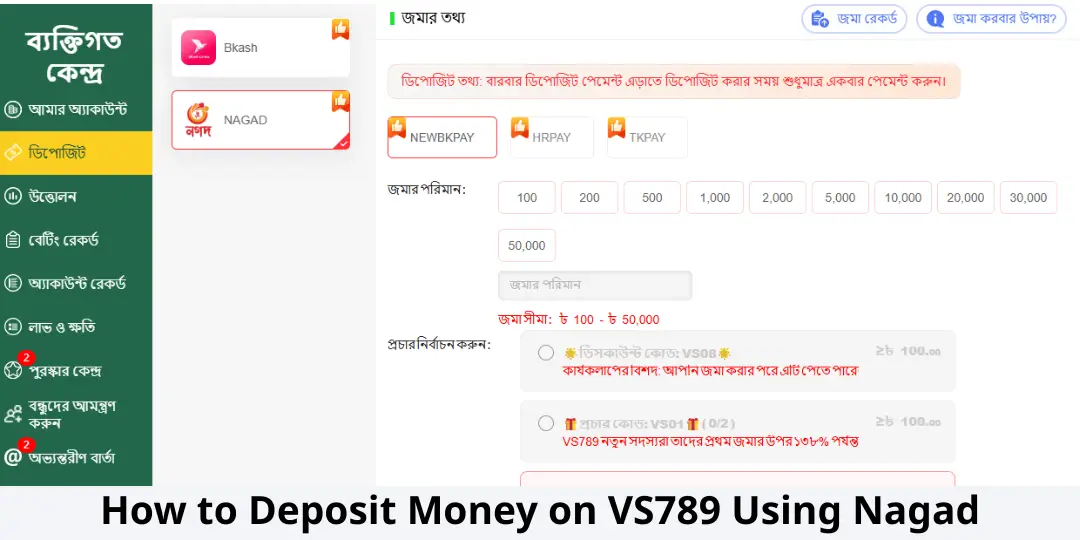
Step 1: Log In to Your VS789 Account
Visit the VS789 website and log in using your registered username and password.
Step 2: Navigate to the Deposit Section
After logging in, locate and click the Deposit button from the main dashboard.
Step 3: Select Nagad as Your Payment Method
From the list of available payment options, choose Nagad.
Step 4: Enter the Deposit Amount
Specify the amount you wish to deposit into your VS789 account.
For example:
- Minimum Deposit: 500 BDT
- Maximum Deposit: Subject to platform limits
Step 5: Complete the Payment via Nagad
Open your Nagad mobile application and follow these steps:
- Select Send Money or Payment.
- Enter the receiver account number provided by VS789.
- Input the exact deposit amount.
- Confirm the transaction using your Nagad PIN.
Step 6: Verify Your Account Balance
Once the transaction is completed successfully, the deposited amount will be credited to your VS789 account within a few minutes.
==>Read more Guide : VS789 Withdrawal
Tips for a Successful VS789 Deposit
To ensure a smooth transaction, keep the following tips in mind:
- Double-check the recipient account number before sending money.
- Use the same mobile number registered on your VS789 account whenever possible.
- Enter the exact deposit amount requested.
- Save your transaction ID for future reference.
- Contact customer support if your balance is not updated within 10–15 minutes.
Nagad vs bKash vs Rocket – Comparison Table
| Feature | Nagad | bKash | Rocket |
|---|---|---|---|
| Transaction Speed | ⭐⭐⭐⭐⭐ | ⭐⭐⭐⭐⭐ | ⭐⭐⭐⭐ |
| Popularity | ⭐⭐⭐⭐ | ⭐⭐⭐⭐⭐ | ⭐⭐⭐ |
| Transaction Fees | ⭐⭐⭐⭐⭐ | ⭐⭐⭐⭐ | ⭐⭐⭐⭐ |
| Security | ⭐⭐⭐⭐⭐ | ⭐⭐⭐⭐⭐ | ⭐⭐⭐⭐ |
| Ease of Use | ⭐⭐⭐⭐⭐ | ⭐⭐⭐⭐⭐ | ⭐⭐⭐⭐ |
| 24/7 Availability | ⭐⭐⭐⭐ | ⭐⭐⭐⭐⭐ | ⭐⭐⭐ |
| Success Rate | ⭐⭐⭐⭐⭐ | ⭐⭐⭐⭐⭐ | ⭐⭐⭐⭐ |
| Overall Rating | 9.8/10 | 9.7/10 | 8.8/10 |
Which Payment Method Should You Choose?
If you are looking for fast transactions and lower fees, Nagad is an excellent option. Users who prefer the largest and most established mobile payment ecosystem in Bangladesh may choose bKash. Meanwhile, Rocket remains a reliable alternative, especially for customers already connected to Dutch-Bangla Bank services.
Final Thoughts
Making a VS789 Deposit via Nagad is simple, secure, and efficient. With instant transaction processing, strong security measures, and widespread accessibility, Nagad has become one of the most trusted payment methods for VS789 users in Bangladesh.
Follow the deposit instructions carefully, verify your transaction details, and enjoy a smooth and uninterrupted experience on VS789.